


ファンドマネージャーになる方法
アセットマネジメントプラットフォームが公開された後、以下の
Gate 資産管理紹介ページ(https://www.gate.com/asset-management/institution/asset-landing)から申請を提出し、スタッフからの連絡をお待ちください。承認後、ファンドマネージャーとしてのフルアクセス権が付与されます。その後、商品のローンチ、資金調達、投資、管理、清算まで、商品ライフサイクル全体を一か所で管理できるようになります。
<img src=
"https://gimg.staticimgs.com/image/ama_20260114_221341_2f2f1a0efe2fe52109141c090d41f2cd.png" alt="资管业务申请英" width="700"/>
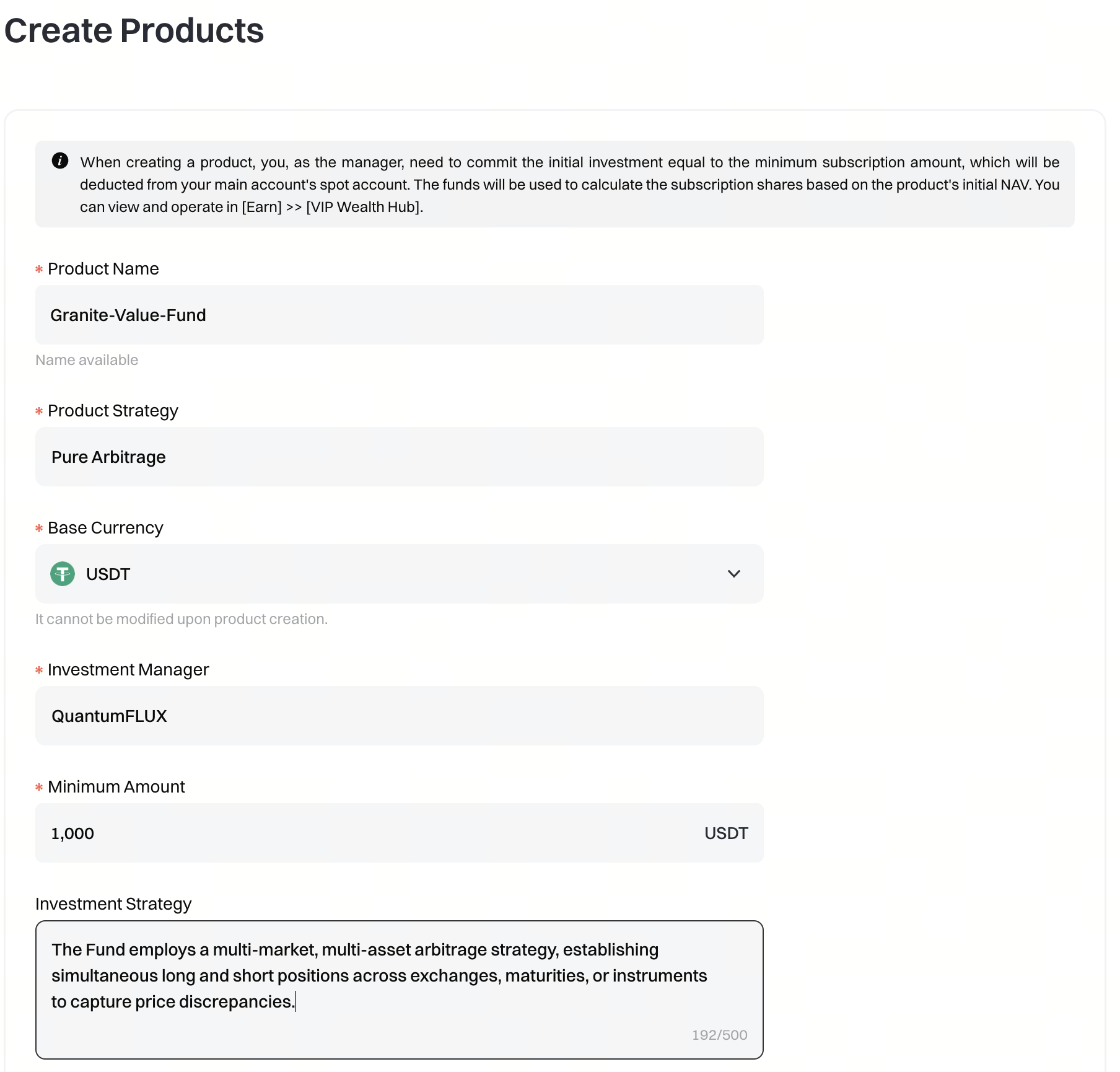
商品作成
資産管理システムの左側メニューで[Create Product]を選択し、新しい商品を作成します。商品作成ページで、商品名、商品戦略、基軸通貨、投資マネージャー、最低金額、投資戦略を入力し、商品を作成してください。本商品はイニシエート型サブスクリプションを採用しており、商品作成時にはファンドマネージャー自身が最初の投資家として参加する必要があります。マネージャーは最低申込額を拠出し、基準価額1.0で商品を購入する必要があります。申込後、ファンドマネージャーは対応する商品ユニットを保有し、その損益は[Earn]-[VIP Wealth Hub]で確認できます。
- [VIPウェルスハブ].<img src= "https://gimg.staticimgs.com/image/amm_20260114_221610_b04496cd5a7e3033246b3bec402229f1.png" alt="资管产品创建菜单英" width="250"/>
商品の資金調達
商品一覧ページで、すべての商品を確認できます。一覧から商品リンクをプレビューおよびコピーでき、投資家へ共有することが可能です。投資家がこのリンクから申込を行う際、投資金額を指定します。投資家が受け取るユニット数は、翌日の評価決済(08:30 UTC)時点の商品の1口あたり純資産価値(NAV)に基づいて計算されます。
<img src=
"https://gimg.staticimgs.com/image/ammi_20260114_221925_561820a6a6caead143250b32996d1db8.png"alt="资管产品购买链接英" width="700"/>
投資家向け商品販売ページ
<img src=
"https://gimg.staticimgs.com/image/ivt_20260114_222027_327edb3debd5511d3e0752aee6198fe3.png"alt="产品购买页英" width="700"/>
本コンテンツは参考および教育目的のみであり、金融、投資、取引、または法律に関する助言を構成するものではなく、いかなるデジタル資産の売買の申込みまたは勧誘を構成するものでもありません。Gateは、本コンテンツに含まれる情報の正確性、完全性、適時性について、明示または黙示のいかなる表明または保証も行いません。商品機能、インターフェース、ルール、手数料体系は、いつでも更新または調整される場合があります。最も正確な詳細については、最新のお知らせおよびGateプラットフォーム上に表示される実際の情報をご参照ください。
デジタル資産への投資には重大なリスクが伴い、価格は大幅に変動する可能性があります。投資額の全額を失う可能性があります。関連するリスクを十分に理解したうえで、ご自身の財務状況とリスク許容度に基づき、慎重に判断してください。必要に応じて、独立した専門の金融または法律アドバイザーへ相談することを推奨します。
想定されるリスクの詳細については、Gateのリスク開示およびユーザー契約をご参照ください。


