


To incentivize more creators and enhance the platform's content ecosystem, Gate Live has fully upgraded its live mining commission program! With this upgrade, individual live mining can earn up to 30% commission. Learn More
How to Set Up Live Mining Commission?
If you are already a Gate Live streamer, you can quickly start earning live mining commissions by following these simple steps.
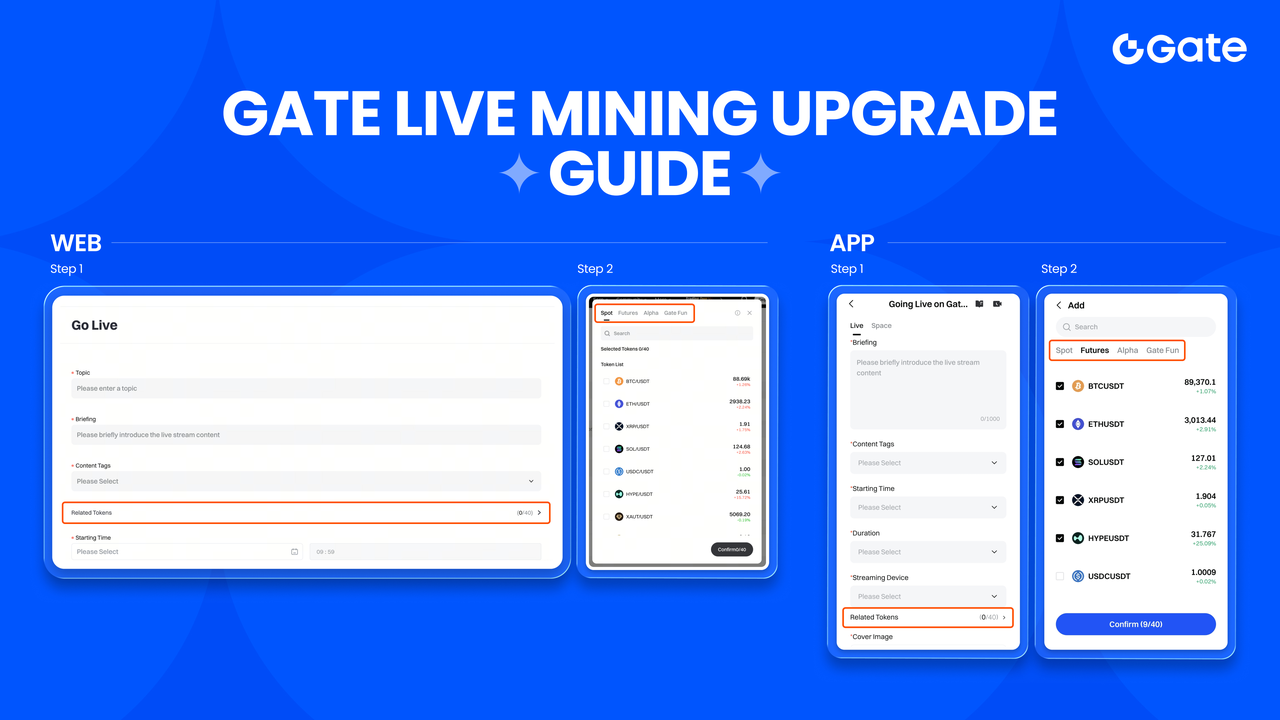
Web Version Setup Steps
-
Go to the Live Stream Application Page
In the application interface, find the “Related Token” option and click to add. You can choose up to 40 tokens . -
Select Related Tokens
You can choose up to 40 tokens from the spot, contract, Alpha, and Gate Fun lists. All tokens on the platform are supported. -
Start Live Stream Explanation & Recommendation
After viewers enter the stream, they can trade through the recommended token list on your page. It's recommended to pin the tokens you are currently explaining to the top to make it easier for viewers to operate and improve transaction efficiency.
- During the live stream, you can also choose to add or remove tokens as needed.
App Version Setup Steps (Must Be Updated to v8.6.0)
-
Click the Bottom Right Button to Apply for a Live Stream
In the interface, find the “Related Token” option and click to add. You can choose up to 40 tokens . -
Select Related Tokens
Choose up to 40 tokens from the spot, contract, Alpha, and Gate Fun lists. All platform tokens are supported. -
Start Live Stream Explanation & Recommendation
After viewers enter the live stream, they can trade through the recommended token list on your page. It's suggested to pin the tokens you're explaining to the top for easier navigation and improved trading efficiency.
- You can also add or remove tokens as needed during the stream.
Video Tutorial Guide (Web)
Disclaimer
The content provided herein is for reference and educational purposes only and does not constitute any financial, investment, trading, or legal advice, nor does it constitute an offer or solicitation to buy or sell any digital assets. Gate makes no express or implied representations or warranties regarding the accuracy, completeness, or timeliness of the information contained herein. Product features, interfaces, rules, and fee structures may be updated or adjusted at any time. Please refer to the latest announcements and the actual information displayed on the Gate platform for the most accurate details.Digital asset investments involve significant risk, and prices may fluctuate substantially. You may lose the entire amount of your investment. Please make decisions cautiously based on your own financial situation and risk tolerance after fully understanding the associated risks. If necessary, you are advised to consult an independent professional financial or legal advisor.
For more information about potential risks, please refer to Gate's Risk Disclosure and User Agreement.
