Meta’s AI Agent platform Manus releases desktop application, allowing AI to directly control users’ computers through the “My Computer” feature, enabling local automation tasks.
(Background: Meta announced the acquisition of AI unicorn Manus, expanding productivity possibilities for FB, IG, and Threads)
(Additional context: China’s popular AI agent “Manus” received a $75 million investment from Silicon Valley Benchmark, valuing it at over $500 million)
Table of Contents
Toggle
- Develop apps in 20 minutes, automatically categorize thousands of photos
- How to get started?
- Security: User authorization required at every step
Meta’s acquired AI agent platform Manus officially released its desktop app last night (16th), featuring the core “My Computer” function.
This update allows Manus to no longer be limited to cloud environments but to directly control users’ macOS or Windows systems, performing local tasks such as file management, application development, and hardware scheduling. Previously, Manus could only operate in isolated cloud environments, with internet and file handling capabilities, but without access to software and documents on the user’s computer.
Develop apps in 20 minutes, automatically categorize thousands of photos
In practical applications, according to official demo videos, the system built a real-time meeting translation app in just 20 minutes without opening Xcode development tools, using terminal commands.
For daily file management, Manus can automatically scan and categorize thousands of photos or batch rename hundreds of invoices into a unified format.
How to get started?
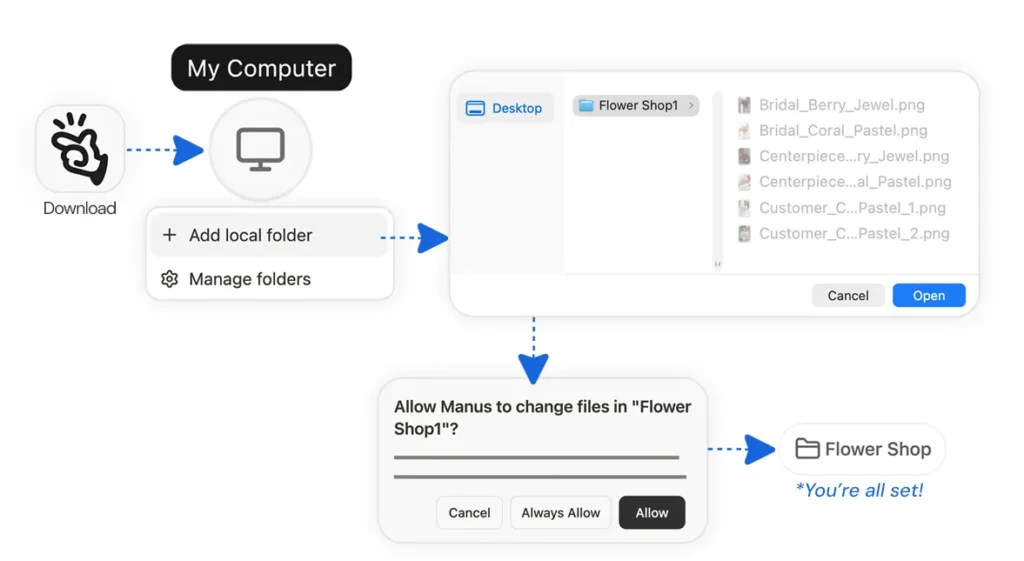
- Download the Manus desktop app from the official website and log into your Manus account
- Click “My Computer” and add the local folders you want Manus to access
- Select and authorize the folders
Security: User authorization required at every step
Addressing security concerns, Manus adopts a “manual intervention” mode. Before executing each terminal command, users must choose “Always Allow” or “Allow Once” to prevent accidental operations or unauthorized system changes.
Currently, Manus Desktop supports both macOS (Apple Silicon) and Windows platforms, available for download via the official website.

Disclaimer: The information on this page may come from third parties and does not represent the views or opinions of Gate. The content displayed on this page is for reference only and does not constitute any financial, investment, or legal advice. Gate does not guarantee the accuracy or completeness of the information and shall not be liable for any losses arising from the use of this information. Virtual asset investments carry high risks and are subject to significant price volatility. You may lose all of your invested principal. Please fully understand the relevant risks and make prudent decisions based on your own financial situation and risk tolerance. For details, please refer to
Disclaimer.


