


Applicability
This article applies to: Gate Web platform
Before you begin: Familiarize yourself with basic blockchain concepts and ensure your Gate Web3 wallet is activated
Estimated time required: 3 minutes
Objective
This article will help you understand the concept of miner fees/Gas fees, how they are calculated, and their characteristics across different blockchain networks.
What are Miner Fees/Gas Fees?
Miner fees (Gas fees) are mandatory charges for every transaction on the blockchain, similar to transaction fees in everyday banking. They can also be considered as processing fees for on-chain transactions.
Core functions:
- Serve as the operational cost for blockchain networks
- Determine transaction priority in most blockchain networks
- Incentivize miners or validators to process and confirm transactions
How Miner Fees Are Calculated
Miner fee calculation methods vary across blockchain networks. Here are the main calculation rules for major blockchains:
Ethereum Network
Calculation formula:
Gas Fee = Gas Units Used × (Base Fee + Priority Fee)Fee components:
- Base Fee: The network automatically adjusts this base cost based on current congestion
- Priority Fee: Users can set this themselves to incentivize miners to prioritize their transaction
Solana Network
Fee components:
- Miner Fee: Fixed base transaction fee
- Rent: Fee for storing data on-chain
Characteristics:
- Solana’s base transaction fee is relatively fixed, but users can still pay a priority fee to increase transaction priority. Competition mainly occurs in localized fee markets rather than the network-wide gas bidding seen on Ethereum.
Other Blockchain Networks
Most blockchain networks use a fee bidding model, allowing users to increase their Gas fee to raise transaction priority.
How to Set Gas Fees in Gate Web3 Wallet
When sending, swapping, or inscribing, if you want your transaction to be processed with higher priority, you can adjust the Gas fee as follows:
Step 1: Go to the Transaction Confirmation Page
Whenever you perform an action requiring a Gas fee, the system will automatically direct you to the transaction confirmation page.
Step 2: Choose a Gas Fee Tier
On the transaction confirmation page, click the Gas fee settings option and select an appropriate tier:
- Slow: Lower Gas fee, longer confirmation time
- Standard: Balanced Gas fee and confirmation speed
- Fast: Higher Gas fee, transaction is prioritized
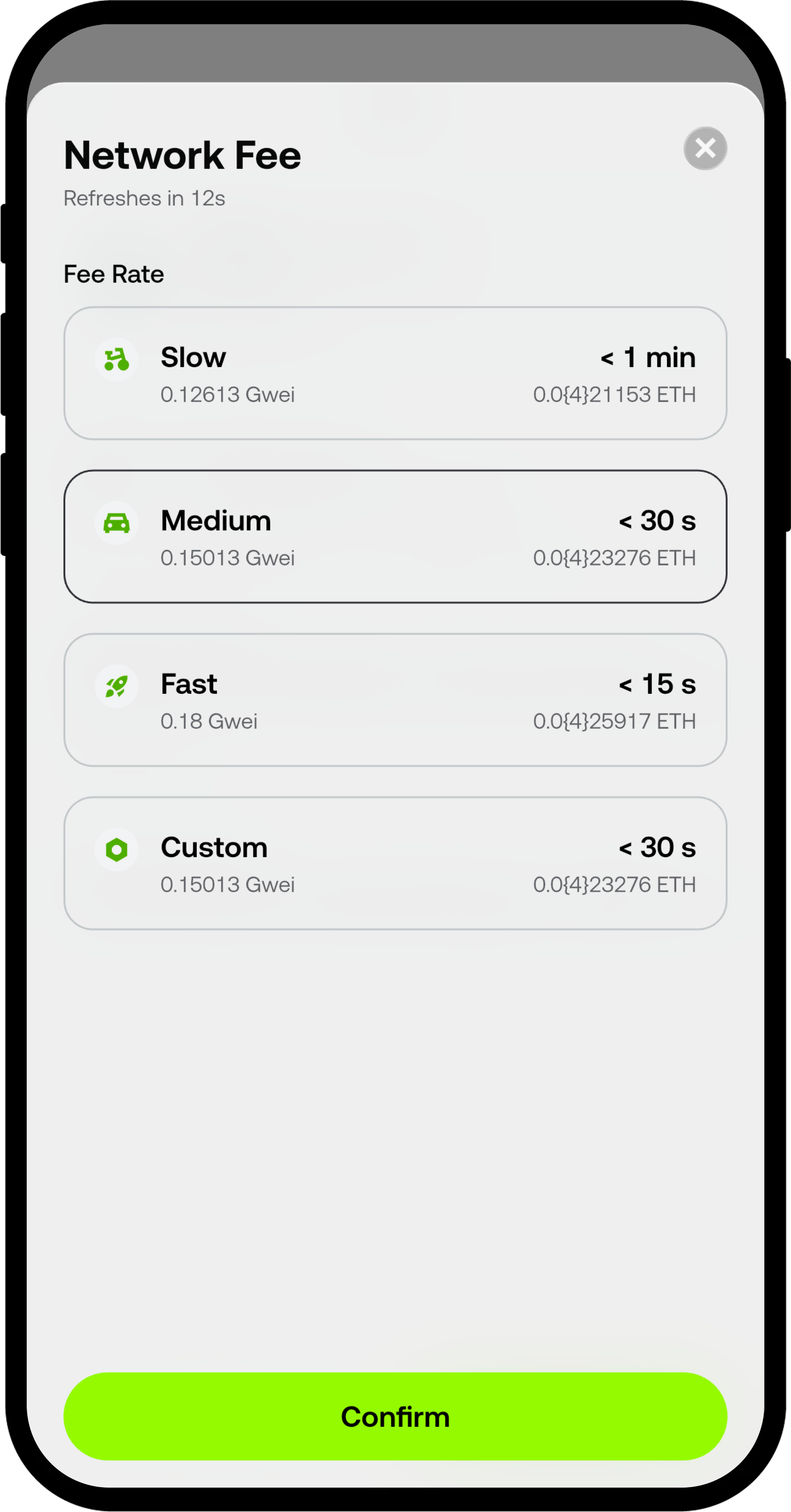
Step 3: Confirm and Submit the Transaction
After confirming your Gas fee settings, click Confirm to submit the transaction.
Important Notes
-
Miner fees fluctuate in real time
- Miner fees are not fixed and change dynamically based on the network’s real-time status
- Fees may spike significantly during network congestion
-
Fees are determined by the blockchain network
- The amount of miner fees is set by each blockchain network
- Gate or Gate Web3 Wallet cannot control miner fees and does not charge any related fees
-
High Gas fees do not guarantee success
- Setting a higher Gas fee increases the likelihood of your transaction being prioritized
- However, it does not guarantee success; if the transaction fails, the miner fee will not be refunded
-
Different networks have different rules
- Some networks do not support speeding up transactions by increasing fees
- It’s recommended to choose Gas fee strategies based on the characteristics of each blockchain network
Frequently Asked Questions
Q1: Why did my Gas fee suddenly increase?
A: Gas fees are affected by blockchain network congestion. When network usage rises, miner fees also increase. It’s recommended to transact during off-peak hours or select a lower Gas fee tier and wait patiently.
Q2: Will Gas fees be refunded if my transaction fails?
A: No. Even if the transaction fails, the miner fee is deducted by the blockchain network because miners have already expended computational resources to process the transaction.
Q3: Can I manually set a custom Gas fee?
A: Some blockchain networks allow custom Gas fee settings. If you see a Custom option on the Gate Web3 Wallet transaction confirmation page, you can manually enter your desired Gas fee amount.
Q4: Does Gate Web3 Wallet charge miner fees?
A: No. Miner fees are paid entirely to the miners or validators of the blockchain network. Gate Web3 Wallet does not collect any miner fees.
Disclaimer
The content provided herein is for reference and educational purposes only and does not constitute any financial, investment, trading, or legal advice, nor does it constitute an offer or solicitation to buy or sell any digital assets. Gate makes no express or implied representations or warranties regarding the accuracy, completeness, or timeliness of the information contained herein. Product features, interfaces, rules, and fee structures may be updated or adjusted at any time. Please refer to the latest announcements and the actual information displayed on the Gate platform for the most accurate details.
Digital asset investments involve significant risk, and prices may fluctuate substantially. You may lose the entire amount of your investment. Please make decisions cautiously based on your own financial situation and risk tolerance after fully understanding the associated risks. If necessary, you are advised to consult an independent professional financial or legal advisor.
For more information about potential risks, please refer to Gate's Risk Disclosure and User Agreement.
